Wednesday, 28 September 2016

Passing Multiple Records from one form to another through Args in Dynamics Ax 2012

Passing Multiple Records from one form to another through Args in Dynamics Ax 2012


In my last post, i posted on how to pass Record from one Form to another Form. Now i will pass multiple Record from one Form to another through Args.


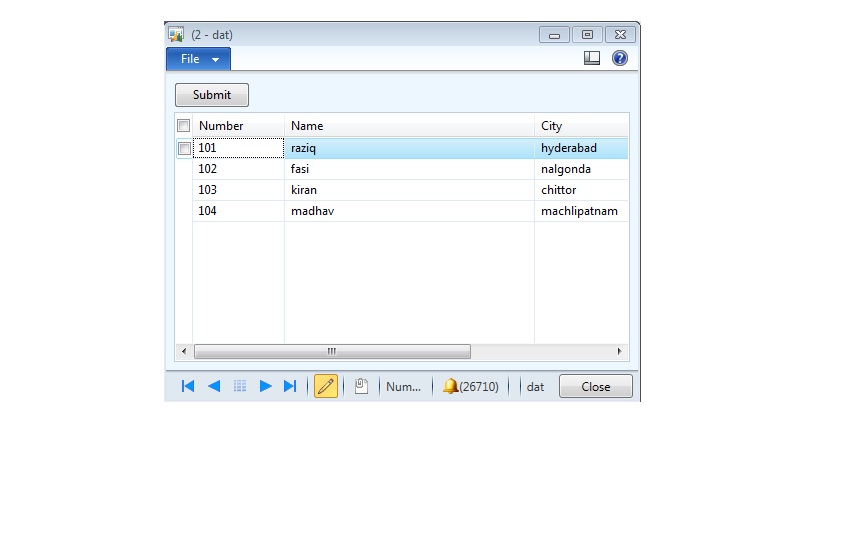
The Scenario is when I select multiple grids in Form A, those records will be passed to FormB and there FormB will received the all those records and filter it and will show.
Step 1: Make one SampleTable which has three fields named (SIno, name, AddressCity).
Step 2: Make FormA with datasource as SampleTable and drag the datasource fields into the design Grid.
Step 3: Drag one button and override the click method and write the following code.
step 4: Make one Display menuitem of FormB.


void clicked()
{
int recordsCount;
SampleTable _sampleTable;
container con;
Args args;
str multiSelectString;
;
args = new Args();
recordsCount = SampleTable_ds.recordsMarked().lastIndex(); // gets the total records selected
_sampleTable = SampleTable_ds.getFirst(1);
while (_sampleTable)
{
// storing recid of selected field in container
con = conIns(con,1,_sampleTable.RecId);
// converting container to string with comma separated
multiSelectString = con2Str(con,’,’);
_sampleTable = SampleTable_ds.getNext(); // moves to next record
}
// passing string
args.parm(multiSelectString);
// calling menu item
new MenuFunction(menuitemDisplayStr(FormBMenuItem), MenuItemType::Display).run(args);
}

first
step 5: Make FormB with datasource as same table for which you take for Form A i.e., SampleTable and drag the fields in to the
Grid of design part.
step 7: write the following code in to the init method of FormB.


public void init()
{
container con;
int i;
str multipleRecords;
super();
// getting string value from caller
multipleRecords = element.args().parm();
// string to container
con = str2con(multipleRecords,”,”);
// for sorting
for(i = 1;i<= conLen(con) ;i++)
{
SampleTbl_ds.query().dataSourceTable(Tablenum(SampleTbl)).addRange(fieldNum(SampleTbl,RecId)).value(SysQuery::value(conPeek(con,i)));
}
}
Please select button property multiselect to “yes

Passing Args from one Form to another Form in dynamics Ax 2012

Passing Args from one Form to another Form in dynamics Ax 2012

Args concept in dynamics ax is awesome. one can easily pass arguments from one Form to another Form with very less effort. Here, i am going to demonstrate how to pass Arguments from Form to Form. The Scenario is when I select one grid in Form A, that record will be passed to Form B and there Form B will received the whole record and filter it and will show.
Step 1: Make one SampleTable which has three fields named (SIno, name, AddressCity).
Step 2: Make FormA with datasource as SampleTable and drag the datasource fields into the design Grid.
Step 3: Drag one button and override the click method and write the following code.
void clicked()
{
Args args;
FormRun formRun;
;
super();
args = new args(formstr(FormB)); // sending Args(record) to FormB
args.record(SampleTable);
formrun = classfactory.formrunclass(args);
formrun.init();
formrun.run();
formrun.wait();
formrun.detach();
}
first
step 4: Make FormB with datasource as same table for which you take for Form A i.e., SampleTable and drag the fields in to the
Grid of design part.

step 5: write the following code in to the init method of FormB.

public void init()
{
SampleTable _sampleTable;
super();
_sampleTable = element.args().record();
SampleTable_ds.query().dataSourceTable(Tablenum(SampleTable)).addRange(fieldNum(SampleTbl,RecId)).
value(SysQuery::value(_sampleTable.Recid));
}

Monday, 26 September 2016

How to: Validate special characters

How to: Validate special characters


Overriding the method ValidateField() from table.

This is how it works on ValidateField():
public boolean validateField(FieldId _fieldIdToCheck)
{
    boolean ret;

    ret = super(_fieldIdToCheck);

    if(ret)
    {
        switch(_fieldIdToCheck)
        {

            case fieldNum (LogisticsEletronicAddress, Locator):
                    ret = ValidateCharacter::validateCharacter(this.Locator) ;

                    if(!ret)
                        error( "The eletronic address has invalid characters" );
                    break;
        }
    }
    return ret;
}
For example, I have used the Table LogisticsEletronicAddress which is responsible to save contact information like e-mail and telephone. I will check if I am validating the field Locator and then call my class. Suppose I have typed “264-497=3131″.
This is my class:
public static boolean validateCharacter(str _name)
{
    System.Text.RegularExpressions.Match    regExMatch;
    boolean                                 isValid = true;
    int                                     length;
    int                                     counter;
    container                               specialCharacters;
    str                                     value;
    ;
    
    // Here I insert all the special characters I want to validate.    
    specialCharacters = conIns(specialCharacters,1, "/");
    specialCharacters = conIns(specialCharacters,2, "[");
    specialCharacters = conIns(specialCharacters,3, "]");
    specialCharacters = conIns(specialCharacters,4, ";");
    specialCharacters = conIns(specialCharacters,5, "=");
    specialCharacters = conIns(specialCharacters,6, @'\');
    specialCharacters = conIns(specialCharacters,7, ":");
    specialCharacters = conIns(specialCharacters,8, ",");
    specialCharacters = conIns(specialCharacters,9, ".");
    specialCharacters = conIns(specialCharacters,10, "!");
    specialCharacters = conIns(specialCharacters,11, "-");
    specialCharacters = conIns(specialCharacters,12, "(");
    specialCharacters = conIns(specialCharacters,13, ")");
    specialCharacters = conIns(specialCharacters,14, "*");
    specialCharacters = conIns(specialCharacters,15, "&");
    specialCharacters = conIns(specialCharacters,16, "^");
    specialCharacters = conIns(specialCharacters,17, "#");
    specialCharacters = conIns(specialCharacters,18, "@");
    specialCharacters = conIns(specialCharacters,19, "_");
    specialCharacters = conIns(specialCharacters,20, "$");
    specialCharacters = conIns(specialCharacters,21, "%");
    specialCharacters = conIns(specialCharacters,22, "?");
    specialCharacters = conIns(specialCharacters,23, "+");
    specialCharacters = conIns(specialCharacters,24, "{");
    specialCharacters = conIns(specialCharacters,25, "}");
    specialCharacters = conIns(specialCharacters,26, "<");
    specialCharacters = conIns(specialCharacters,27, ">");
    specialCharacters = conIns(specialCharacters,29, "~");

    // I set my container length size.
    length = conLen(specialCharacters);

    // Looping through the container
    for (counter = 1; counter <= lenght; counter++)
    {
        // Getting the container value.
        value = conPeek(specialCharacters, counter);

        // Here I use the method StrContains(), it will check the String 
        // character-by-character and return true if it matches the desired value.
        if(strContains(_name, value))
        {
            isValid = false;
        } 
    }
    // Return validation result.
    return isValid;
}
I have used all the special characters that I know of but feel free to add as much as your client requires :). This code will check the string “264-497=3131″ character-by-character and match all the 28 special characters and return it as false (Let’s forget that my telephone number accepts alphabetical characters haha).

Wednesday, 21 September 2016

AX 2012 Post Partial Sales Order using x++ code

AX 2012 Post Partial Sales Order using x++ code
static void Job50(Args _args)
{
salesLine salesLine;
salesFormLetter salesFormLetter;
SalesTable salestable;
;
ttsbegin;
//update Sales Line
salestable = salestable::find('SO_0002');
salesLine = SalesLine::find('SO_0002', 1, true); // find your itemid.
salesLine.SalesDeliverNow = 1;
salesLine.setInventDeliverNow();
salesLine.doUpdate();
//Post the delivery note
salesFormLetter = SalesFormLetter::construct(DocumentStatus::PackingSlip);
salesFormLetter.update(salesTable, SystemDateGet(),SalesUpdate::DeliverNow, AccountOrder::None, false, false);
ttsCommit;
}

Saturday, 10 September 2016

AX service won’t start after migrating to a new SQL Server

AX service won’t start after migrating to a new SQL Server


After migrating the AX databases to a new SQL server you might end up having issues starting the service. If you will search the even log you will probably find the following errors:
Object Server 01: Fatal SQL condition during login. Error message: “[Microsoft][SQL Server Native Client 10.0][SQL Server]Login failed for user ‘domain\user’.”
Object Server 01: The database SQLSERVER\INSTANCE is not recognized as a model store.
The domain\user will be the service account you are using to run the AX service.
Providing this account even with sysadmin on the SQL server will not help you, as the problem is a missing stored procedure on the Master database that is created during the initial AX setup – This stored procedure is missing from your new SQL server and needs to be created manually.
1. Run the following query on your new SQL server (Backup first!)
USE [master]
GO
SET ANSI_NULLS ON
GO
SET QUOTED_IDENTIFIER ON
GO
CREATE procedure [dbo].[CREATETEMPDBPERMISSIONS_AX_SERVER_NAME_01] as begin exec (‘USE tempdb; declare @dbaccesscount int; exec sp_grantlogin ”domain\axserviceaccount”; select @dbaccesscount = COUNT(*) from master..syslogins where name = ”domain\axserviceaccount”; if (@dbaccesscount <> 0) exec sp_grantdbaccess ”domain\axserviceaccount”; ALTER USER [domain\axserviceaccount] WITH DEFAULT_SCHEMA=dbo; exec sp_addrolemember ”db_ddladmin”, ”domain\axserviceaccount”; exec sp_addrolemember ”db_datareader”, ”domain\axserviceaccount”; exec sp_addrolemember ”db_datawriter”, ”domain\axserviceaccount”;’) end
GO
EXEC sp_procoption N'[dbo].[CREATETEMPDBPERMISSIONS_AX_SERVER_NAME_01]’, ‘startup’, ‘1’
GO
* Change “AX_SERVER_NAME” to your AX server name
* Change domain\axserviceaccount to your domain and the account that runs the AX Service (If you are using NETWORK SERVICES for the service (Bad…) the use DOMAIN\MACHINENAME$ for the account)
2. In SSMS go to Databases -> System Databases -> Master -> Programmability -> Stored Procedures:
There you will find the newly created SP. Right click -> Properties
ax1
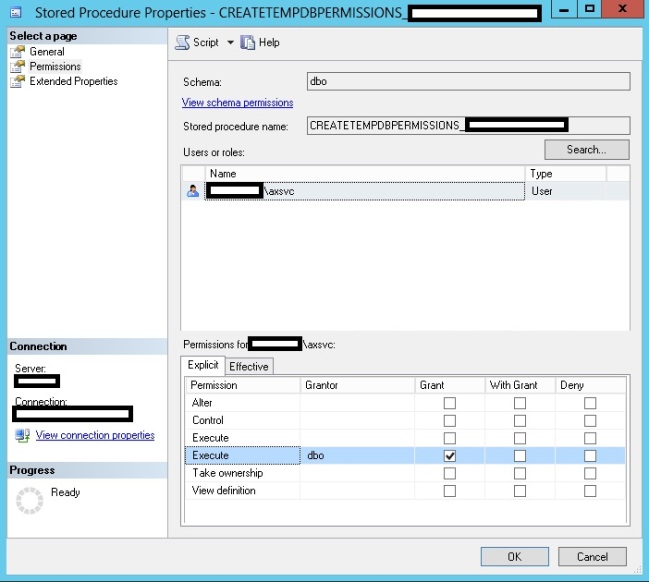
Under permissions – make sure to add the AX service account and grant it the Execute permission
ax2
The service should now start with no issues

 – Don’t forget that the AX service account first needs to be added as a user under security logins and granted the db_datareader, db_datawriter & db_ddladmin roles!

Thursday, 8 September 2016

Axapta query on multiple tables

Multiple Tables In Query

Axapta query on multiple tables

Hey friends try this code to add multiple tables in query.

QueryRun selectReportQuery()
{
    Query                   query           = new Query();
    QueryRun                localQueryRun;
    QueryBuildDataSource    qbds1;
    QueryBuildDataSource    qbds2;
    QueryBuildDataSource    qbds3;
    ;
    qbds1 = query.addDataSource(tableNum(salesTable));
    qbds1.addRange(fieldNum(salesTable, affVendorAdjust)).value('1');
    qbds2 = qbds1.addDataSource(tableNum(custInvoiceJour));
    qbds2.fetchMode(JoinMode::InnerJoin);
    qbds2.relations(false);
    qbds2.addLink(fieldNum(salesTable, salesId),fieldNum(custInvoiceJour, salesId));
    qbds2.addSortField(fieldNum(CustInvoiceJour, OrderAccount), SortOrder::Ascending);
    qbds2.addSortField(fieldNum(CustInvoiceJour, InvoiceId), SortOrder::Ascending);
    qbds2.addRange(fieldNum(CustInvoiceJour, InvoiceDate)).value(queryRange(invBeginDate, invEndDate));
    qbds3 = qbds1.addDataSource(tableNum(salesLine));
    qbds3.relations(true);
    qbds3.joinMode(JoinMode::InnerJoin);
    qbds3.fetchMode(queryFetchMode::One2Many);
qbds3.addRange(fieldNum(salesLine, mbsLineVendor)).value(queryValue(vendAccount));


Here is some more code related to query in axapta
1. Sample union query from AX 2009
2. Building a query object
3. How to create a Query(dynamically)
4. Join Two Tables at Run Time

Tuesday, 6 September 2016

How to make the Dialog field mandatory in Axapta reports

How to make the Dialog field mandatory in Axapta reports


Dialog field Mandatory

In the below , i have marked in yellow shows you , how to make the dialog field mandatory.

public Object dialog(Object _dialog)
{
    int                                  i;
    DialogRunbase              dialog = _dialog;
    DialogField                   checkField;
    FormDateControl          control;
    ;
    dialog.addGroup("@SYS119346");
    fieldConversionDate = dialog.addFieldValue(typeid(InventStdCostConvEndDate),  conversionDate);
    control = fieldConversionDate.fieldControl();
    control.mandatory(true);
    control.allowEdit(false);

      return dialog;
}

Sunday, 4 September 2016

SQL script Get a list of Duties and Privileges based on Security Role

SQL script Get a list of Duties and Privileges based on Security Role

SQL script Get a list of Duties and Privileges based on Security Role 

USE [Model_database_name];

SELECT secRole.AOTNAME [Role_Name], secRoleExplode.SECURITYROLE,
secRole2.AOTNAME [Subrole_Name], secRoleExplode.SECURITYSUBROLE,
secTask.AOTNAME [Task_name], secRoleTask.SECURITYTASK,
secTask2.AOTNAME [secTask2_name], secTaskExplode.SECURITYSUBTASK,
CASE
  WHEN secTask2.TYPE = 0 THEN 'Privilege'
  WHEN secTask2.TYPE = 1 THEN 'Duties'
  ELSE 'Other'
END AS OBJECTTYPE
FROM SECURITYROLE secRole
join SECURITYROLEEXPLODEDGRAPH secRoleExplode
ON secRole.RECID = secRoleExplode.SECURITYROLE
JOIN SECURITYROLE secRole2
ON secRoleExplode.SECURITYSUBROLE = secRole2.RECID
JOIN SECURITYROLETASKGRANT secRoleTask
ON secRoleExplode.SECURITYSUBROLE = secRoleTask.SECURITYROLE
JOIN SECURITYTASK secTask
ON secTask.RECID = secRoleTask.SECURITYTASK
JOIN SECURITYTASKEXPLODEDGRAPH secTaskExplode
ON secRoleTask.SECURITYTASK = secTaskExplode.SECURITYTASK
JOIN SECURITYTASK secTask2
ON secTaskExplode.SECURITYSUBTASK = secTask2.RECID
WHERE secRole.AOTNAME = ''  // Add role name here
ORDER BY OBJECTTYPE, secRoleExplode.SECURITYSUBROLE

AXReportInstanceExtensions COMException error message while trying to install the AX Report instance extensions through PowerShell.

AXReportInstanceExtensions COMException error message while trying to install the AX Report instance extensions through PowerShell.

AXREPORTINSTANCEEXTENSIONS COMEXCEPTION ERROR MESSAGE WHILE TRYING TO INSTALL THE AX REPORT INSTANCE EXTENSIONS THROUGH POWERSHELL.


Install-AXReportInstanceExtensions :
In line:1 char:1
+ Install-AXReportInstanceExtensions -ReportServerInstanceName DAXTest -Credential  ...
+ ~~~~~~~~~~~~~~~~~~~~~~~~~~~~~~~~~~~~~~~~~~~~~~~~~~~~~~~~~~~~~~~~~~~~~~~~~~~~~~~~
    + CategoryInfo          : OpenError: (Microsoft.Dynam...tensionsCommand:InstallReportInstanceExtensionsCommand) [I
   nstall-AXReportInstanceExtensions], COMException
    + FullyQualifiedErrorId : Microsoft.Dynamics.AX.Framework.Management.Reports.InstallReportInstanceExtensionsComman
   d

 To solve this issue you need to start the powershell as administrator and try again.Link

Changing Dynamics AX's forms' caption / text

Changing Dynamics AX's forms' caption / text

Dynamics AX's forms' caption is composed of two parts: The name of the form / table being edited, and the primary key or at least two key fields that tell the user what record he has selected.

But do you know how to change these texts? I'll show you some ways of doing it in this post.

The first part of the caption, the name of the form, can be set on the Caption property, on the Design node of the form:


And that change can be seen on the left side of the form's caption:


Additionally, you can change the left part of the form through coding. Just add the following line on the init method or on whatever other key method you want it to be:
?
1
element.design().caption('Foo');

The second part, which is some information about the record, can be changed in two ways: through property settings, or through X++. I'll show both of them.

The table has two properties that you can use for this, the TitleField1 and TitleField2, under the Appearance node:


After setting them, you'll have to set another property on the form's Design node, the TitleDatasource, which should be the datasource related to your table:


And that's it, the value on the two fields you set on the TitleField1 and TitleField2 properties will be included on the form's caption:


And the last way to do it, through X++, is by overriding the caption method on the table. Of course that since we're changing something directly on the table, our change will reflect throughout the whole system. This means that if you change the caption of a table by overriding the caption method, you'll change the caption of all of the forms where that table was used as the form's caption.

We can do something simple, like this:
?
1
2
3
4
5
6
7
8
9
10
11
12
13
public str caption()
{
    str ret;
 
    ret = super();
     
    if (this.RecId)
    {
        ret = strFmt('Item number: %1, Total sold amount: %2', this.ItemId, this.getTotalSoldAmount());
    }
 
    return ret;
}

?
1
2
3
4
private real getTotalSoldAmount()
{
    return this.UnitPrice * this.SoldQuantity;
}


With the methods above defined on our example table, our form should look like this:


We only change the behavior if the record already exists on the database, by checking if it has a RecId set. We do that because we don't want to change the default text that appears on the form when the user is inserting a new record:

Labels

#veryusefulcode (1) AIF (8) AOT Maps (1) Args (1) Ax 2009 Reports (2) AX 2012 navigation (1) Ax 2012 Interview Questions (1) AX 7 (2) AX Architecture (1) Ax Backup (1) AX Workflow (2) AX2012 (1) AX2012 R2 (1) Ax2012R3 (1) AX2012R3 Dynamics Connector Step by Step Installation and Configuration (1) AX2012R3 EP Step by Step Installation and Configuration EP R3 (1) AX2012R3 HelpServer Step by Step Installation and Configuration (1) AX2012R3 Rapid Start Connector Step by Step Installation and Configuration (1) AX2012R3 Report Server and Analysis Server Step by Step Installation and Configuration (1) AX7 (1) Best practices (1) Blocking user to enter (1) Collection Classes (1) Container (1) D365FO (3) Data Migration Frame Work ax 2012R3 (1) Deleting duplicate Record from Table – Ax2012 (1) Delivery due date notification workflow in Ax 2012 (1) Development Steps EP (1) Dimensions (1) DIXF (1) DMF in Ax 2012 R3 (1) Dynamics Ax 2012 Interview Questions (1) DYNAMICS AX 2012 INTERVIEW QUESTIONS PART 2 (1) DYNAMICS AX 7 (1) EDT relation Migration Tool (1) EP AX 2012 (1) Ep Lookup (1) Error (1) Event Handler (1) F5 (1) File Handling (4) Filter on AX2012 Listpage (1) filtering (2) financial dimensions in AX 2012 (3) form (1) images (1) Installation and Configration (4) Installation and Configuration (11) Installation of Management Reporter 2012 for AX 2012 (1) Interaction class in ax 2012 (1) Interview Question (1) Interview Questions For Ax 2012 (1) Invent DIm (1) Jobs (2) license (1) List page and form menuitem enable code (1) Methods (1) microsoft Dynamics AX 365FO (1) Number Sequence Generation – AX 2012 (5) Number Sequence2012 (1) OLTP-OLAP (1) Passing Args (1) Passing form caller and menu item caller in ax 2012 (1) Passing Multiple Records Args (1) Posting in Ax 2012 (1) POSTING PURCHASE ORDER (1) Query (1) Query Filter Form (2) Query Ranges in X++ (1) Question and Answer (1) Report (1) Reports Controller class (1) RLS in ax 2009 (1) SALES ORDER IMPORT/EXPORT FRAMEWORK BY DMF (1) Security (1) security roles (1) Security Sysqueryrangeutil (1) Sharepoint 2016 (1) SQL SERVER (1) SSRS (2) SSRS Reports Controller class (2) Table collections & Virtual company (1) Time (1) TIPS AND TRICKS (1) Web service AIF (3) Web Services on IIS (AIF) Step by Step Installation and Configuration (1) workflow ax2012 (1) Workflow installation (1) Workflow Method (3) X++ (1)